
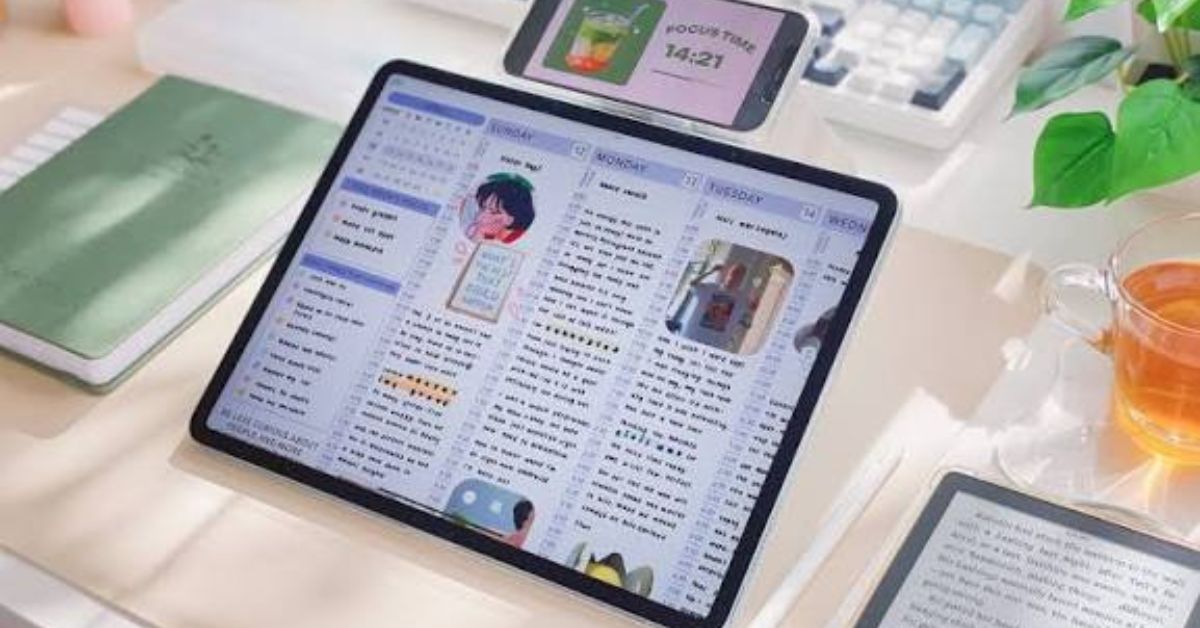

Paper planners still have their charm, but digital planning has changed how many people organize work, school, finances, habits, and personal goals. With a tablet and a note taking app, you can carry an entire planning system without filling a backpack with notebooks. The best digital planners combine calendars, task lists, notes, goal tracking, creative pages, and easy navigation in one flexible workspace.
This guide explains what makes a digital planner useful in real life and what features deserve your attention before you buy one. We will also look closely at Cyberry 2026, including its calendar shortcuts, goal pages, templates, finance and wellness sections, note dividers, and customization options. Finally, you will learn how digital planners compare with paper planners and how to build a planning routine that you can actually maintain.
What Is a Digital Planner?
A digital planner is an electronic planning system designed for use on a tablet, computer, or compatible smartphone. Many are distributed as interactive PDF files that work inside note taking applications such as Goodnotes. Instead of writing on physical paper, you use a stylus, keyboard, or touchscreen to add handwriting, typed notes, drawings, highlights, stickers, and other elements.
The main advantage is flexibility. A single planner can include yearly, monthly, weekly, and daily pages while also offering sections for projects, notes, habits, finances, or personal goals. Hyperlinks can connect different sections, allowing you to jump between pages quickly. Some modern planners go further by connecting planning shortcuts with calendar and reminder applications.
Why Digital Planners Are Becoming So Popular
Convenience is one of the biggest reasons digital planning continues to attract users. A tablet can hold multiple planners, notebooks, reference documents, and templates at once. You can also duplicate pages, move elements, erase mistakes, and customize layouts without carrying additional supplies.
Digital planners also fit naturally into existing technology habits. If you already use a calendar app, cloud storage, or a note taking platform, a planner can become another part of that system. For students, professionals, entrepreneurs, and creatives, this can make planning more connected to everyday digital work rather than treating planning as a separate activity.
Another advantage is creative freedom. Digital stickers, handwriting tools, colors, images, and reusable templates let you create a planning style that feels personal. However, more features do not automatically make a planner better. The strongest option is usually the one you will open consistently.
What Makes the Best Digital Planners Different?
The best digital planners are designed around usability rather than decoration alone. Clear navigation, readable layouts, useful hyperlinks, sensible page organization, and enough writing space matter more than having hundreds of flashy elements. A beautiful planner that takes too long to navigate can quickly become frustrating.
Flexibility is another important factor. Look for planners that support several planning styles, such as daily, weekly, and monthly views. Templates can also help when your needs change. Someone managing a work project may need a detailed weekly schedule, while another person may prefer a simple habit tracker or freeform notes page.
Compatibility deserves attention too. Before buying, check whether the planner works with your preferred application and device. For example, the Cyberry 2026 landscape listing states compatibility with Goodnotes 6 across Apple, Android, Windows, and web devices.
Cyberry 2026: A Highly Customizable All-in-One Planner
Cyberry 2026 stands out as an all-in-one digital planner aimed at users who want organization and creativity in the same system. The current product information lists yearly and quarterly calendars, monthly planning areas, weekly layouts, daily pages, notes, vision boards, goals, finances, wellness, reflections, templates, notepapers, and hyperlinked note dividers.
It is available in portrait and landscape versions, with additional files designed for apps such as Goodnotes and Noteful. The package also includes planner covers, labels, app icons, and digital elements. That makes it more than a simple dated calendar. Instead, it functions as a broader digital organization system for people who want planning, journaling, notes, and creative customization together.
For users who enjoy personalization, the planner also includes customizable covers and digital stickers. Its Apple Shortcuts integration can connect certain planning actions with Apple Calendar, Google Calendar, or Reminders, although that feature requires Apple Shortcuts.
Advanced Calendar and Reminder Shortcuts
One useful feature in Cyberry 2026 is its shortcut integration. According to the product listing, the shortcuts are designed for Apple Shortcuts and can work with Reminders, Apple Calendar, or Google Calendar.
This matters because a digital planner does not have to replace your existing calendar. Instead, the planner can serve as a visual planning layer while your calendar or reminder service continues handling scheduled events and notifications. That separation can be helpful. You can use the planner to think through your week while relying on your calendar for alerts.
There is a small learning curve, however. Shortcut based workflows are more useful once they are configured correctly. People who prefer a simple handwriting experience may not need them, while productivity focused users may appreciate the connection between visual planning and digital reminders.
Goal Setting and Quarterly Planning
Long term goals can become difficult to manage when you only focus on today’s task list. Quarterly planning provides another level of perspective. Cyberry 2026 includes yearly and quarterly overview pages, along with quarterly breakdowns for Q1 through Q4.
This structure can help you divide a large goal into smaller periods. For example, instead of writing “launch a business” as one vague annual objective, you could use quarterly pages to map research, preparation, launch, and review stages. The same approach can work for fitness, education, creative projects, savings goals, or career planning.
A good planning system should encourage action rather than simply collect goals. Review your quarterly objectives regularly and connect them to monthly and weekly tasks. That is where a digital planner becomes more useful than a static goal list.
Note Dividers Return
Organization becomes increasingly important when a planner contains many different sections. Cyberry 2026 includes 12 hyperlinked note dividers, allowing users to separate information into distinct areas.
Dividers can be especially helpful if you use the same planner for personal and professional planning. You might dedicate sections to projects, study notes, journaling, brainstorming, or reference material. Instead of creating several disconnected notebooks, you can keep related information inside one structured file.
Hyperlinks also reduce the amount of scrolling required. This small navigation feature can make a major difference when you use a planner every day. The goal is simple: the page you need should be easy to reach.
Template Library Adds Flexibility
A template library gives users more choices without forcing them to redesign pages from scratch. Cyberry 2026 introduces a template library with additional daily and weekly layouts, along with blank pages that can be adapted to personal workflows.
That flexibility matters because planning habits are rarely identical from one person to another. A freelancer may want project blocks and deadlines, while a student might need study sessions and assignment tracking. Someone focused on wellness may want habits and reflection space instead.
Reusable templates also reduce friction. If a certain layout works well for you, you can continue using that format instead of rebuilding your ideal page every week. The result is a planner that can evolve with your schedule.
Finance and Wellness Planning
Planning is not limited to appointments and tasks. Money management and personal wellness are also part of many people’s routines. Cyberry’s monthly quick menu includes dedicated finance and wellness pages. The finance area is described as covering income, savings, debts, and monthly summaries, while wellness pages include areas such as mood, habits, sleep, and movement.
These sections can help bring different parts of life into one planning system. A monthly finance review can sit alongside your goals, while wellness tracking can show patterns in sleep, habits, or movement. Still, a digital planner should not be treated as professional financial or medical advice. It is primarily a personal organization tool.
The biggest benefit is visibility. When information is easier to see, it can become easier to review and act on.
Daily and Weekly Planning
Daily and weekly pages form the practical core of most digital planners. Long term goals are useful, but everyday planning is where those goals become actual tasks. Cyberry 2026 offers vertical, horizontal, and custom weekly layouts, along with daily pages.
Different layouts suit different thinking styles. A vertical schedule can work well for time blocking, while a horizontal format may provide more room for notes. A custom page can be useful when your routine changes from week to week.
The best approach is not to fill every available space. Choose a manageable number of priorities. Then leave enough room for unexpected tasks, notes, and changes. A planner should reduce mental clutter, not create another demanding project.
Digital Stickers and Planner Customization
Customization is one of the features that separates digital planners from ordinary digital calendars. Users can add stickers, handwriting, images, highlights, and other visual elements. Cyberry 2026 includes Goodnotes and Noteful elements, PNG files, planner covers, labels, and app icons.
Digital stickers can also serve a practical purpose. A small icon can identify a deadline, appointment, workout, study session, or personal event at a glance. The visual layer can make a busy page easier to scan.
However, customization works best when it supports navigation and clarity. Too many decorative elements can make important information harder to find. A useful rule is to decorate after the planning is complete rather than letting decoration replace planning.
GoodNotes and Other Digital Planning Apps
Goodnotes is one of the best known applications for digital handwriting and PDF based planning. Its marketplace currently lists Cyberry 2026 as compatible with Goodnotes 6 on Apple, Android, Windows, and web devices.
Other note taking applications may support digital planners as well, but compatibility can differ depending on the planner’s file format and features. Basic PDF annotation is not always the same as full support for draggable elements, stickers, hyperlinks, or app specific files.
Before buying a planner, check both the planner requirements and your application version. If you depend on advanced features, do not assume that every note taking app will behave exactly like Goodnotes or Noteful. Compatibility should be one of your first checks.
Best Digital Planners for Different Planning Styles
There is no single planner that is automatically best for everyone. A student may prioritize class schedules, assignment tracking, and study notes. A professional may care more about time blocking, meetings, deadlines, and project management. A creative user may value blank pages, vision boards, stickers, and flexible layouts.
For people who want an all-in-one experience, Cyberry 2026 is particularly notable because it combines calendars, goals, finances, wellness, notes, templates, and creative elements. For simpler users, a minimal hyperlinked planner may be a better choice because it reduces visual clutter.
Think about how you already organize your life. The best digital planner should improve that behavior rather than force you into an entirely different system.
Digital Planner vs. Traditional Paper Planner
Paper planners offer a tactile writing experience that many people genuinely enjoy. They require no battery, have no software compatibility issues, and can make planning feel separate from screen based distractions. For some users, that physical experience is part of the value.
Digital planners offer a different set of benefits. You can carry multiple planning files, erase mistakes, duplicate pages, use digital stickers, search certain content, and jump between hyperlinked sections. A tablet can also replace several notebooks in a bag.
Neither format is universally better. The right choice depends on your habits, devices, and planning goals. Some people even use both: digital planning for detailed organization and paper for quick notes or creative journaling.
What to Look for Before Buying a Digital Planner
Start with compatibility. Confirm that the planner works with your device and preferred note taking application. Then examine navigation. Hyperlinks, indexes, tabs, and clear menus can make a planner much easier to use.
Next, consider the actual page structure. Does it offer daily, weekly, and monthly views? Are there enough notes pages? Does it include goal tracking, project planning, habit tracking, or finance pages if you need them? Also check whether the planner is dated or undated.
Finally, review the purchase terms. Digital products may have different refund and exchange policies from physical products. For example, the Cyberry product listing states that digital purchases are not eligible for refunds or exchanges. Checking these details before purchasing can prevent unpleasant surprises.
Are Digital Planners Worth It?
Digital planners can be worth the investment when you use their flexibility regularly. A planner that helps you manage deadlines, routines, goals, notes, and projects from one device can save time and reduce the need for multiple physical notebooks.
The value depends less on the number of pages and more on how well the system fits your habits. Buying an expensive planner and abandoning it after two weeks will not improve productivity. A simpler planner that you open every morning may deliver far more practical value.
For users who enjoy handwriting on a tablet and want several planning categories in one place, an all-in-one product such as Cyberry 2026 can make sense. Its combination of calendars, templates, wellness, finance, notes, and customization gives it broad coverage.
How to Build a Better Digital Planning Routine
Start small. At the beginning of each week, review appointments, deadlines, important tasks, and personal priorities. Then decide what genuinely needs attention. Avoid turning every small activity into a tracked task.
At the end of the week, spend a few minutes reviewing what worked and what did not. Move unfinished priorities forward only when they still matter. If something repeatedly moves from one week to another, ask whether it should be removed, delegated, scheduled differently, or broken into smaller steps.
Use your planner as a decision making tool rather than a record of everything you did. The goal is not to create the fullest possible planner. It is to create a clearer week.
The Future of Digital Planning
Digital planning is likely to become more connected with the broader productivity tools people already use. Calendar integration, reminders, reusable templates, handwriting recognition, cross platform access, and smarter organization can make planning more interactive.
At the same time, the core idea will remain familiar. People still need a place to decide what matters, organize time, capture ideas, and review progress. Technology changes the tools, but not the underlying need for structure.
The direction of products such as Cyberry 2026 shows how digital planners are moving beyond simple calendar PDFs. Current versions combine planning pages with creative assets, templates, app shortcuts, wellness sections, financial pages, and multiple navigation options.
FAQs
What are the best digital planners for 2026?
The best digital planner depends on your needs, but all-in-one planners such as Cyberry 2026 offer calendars, goals, notes, templates, wellness, finance, and customization.
What is the best digital planner for Goodnotes?
A Goodnotes planner should have strong PDF navigation, hyperlinks, useful templates, and compatibility with your version of Goodnotes. Cyberry 2026 is listed as compatible with Goodnotes 6.
Are digital planners better than paper planners?
Digital planners offer customization, reusable templates, hyperlinks, and portability, while paper planners provide a tactile experience without batteries or apps. Your habits should determine the better option.
Can I use a digital planner on an iPad?
Yes. Many digital planners are designed for tablet note taking applications. Check the individual product’s compatibility requirements before purchasing.
How do digital planners help with productivity?
They can organize goals, schedules, tasks, notes, and routines in one place. Their main benefit comes from consistent use rather than simply owning a feature rich planner.
Conclusion
The best digital planners are not necessarily the ones with the most pages or the most decorative features. They are the systems that make planning easier, clearer, and more consistent. A useful planner should provide practical navigation, enough writing space, flexible layouts, and features that match your real routine.
Cyberry 2026 is an interesting all-in-one option because it combines yearly and quarterly planning with daily and weekly layouts, templates, notes, finance and wellness pages, digital elements, and shortcut integration. Whether you choose it or another planner, start with your planning style and device compatibility. The right digital planner should support your life, not make organizing it feel like another chore.

SEO specialist and content creator with 4 years of experience in search engine optimization, keyword research, and digital publishing. Passionate about creating high-quality, user-focused, and trending content for JournelTrends.com while helping readers discover valuable information online.
